If you have spent any time dealing with FMCSA registrations, you have probably come across two names that cause a lot of confusion: MOTUS and the SAFER system.
Some carriers think they are the same thing. Some think one replaces the other. And some have no idea which one to use for what they need to do.
Getting this wrong wastes time. You end up in the wrong system trying to do something it was not built for and your registration, compliance update, or carrier lookup does not get done.
This guide settles it once and for all. You will learn exactly what MOTUS is, what the SAFER system is, how they are different, when you use each one, and how they work together inside the FMCSA’s broader compliance infrastructure.
MOTUS vs SAFER System: Quick Answer
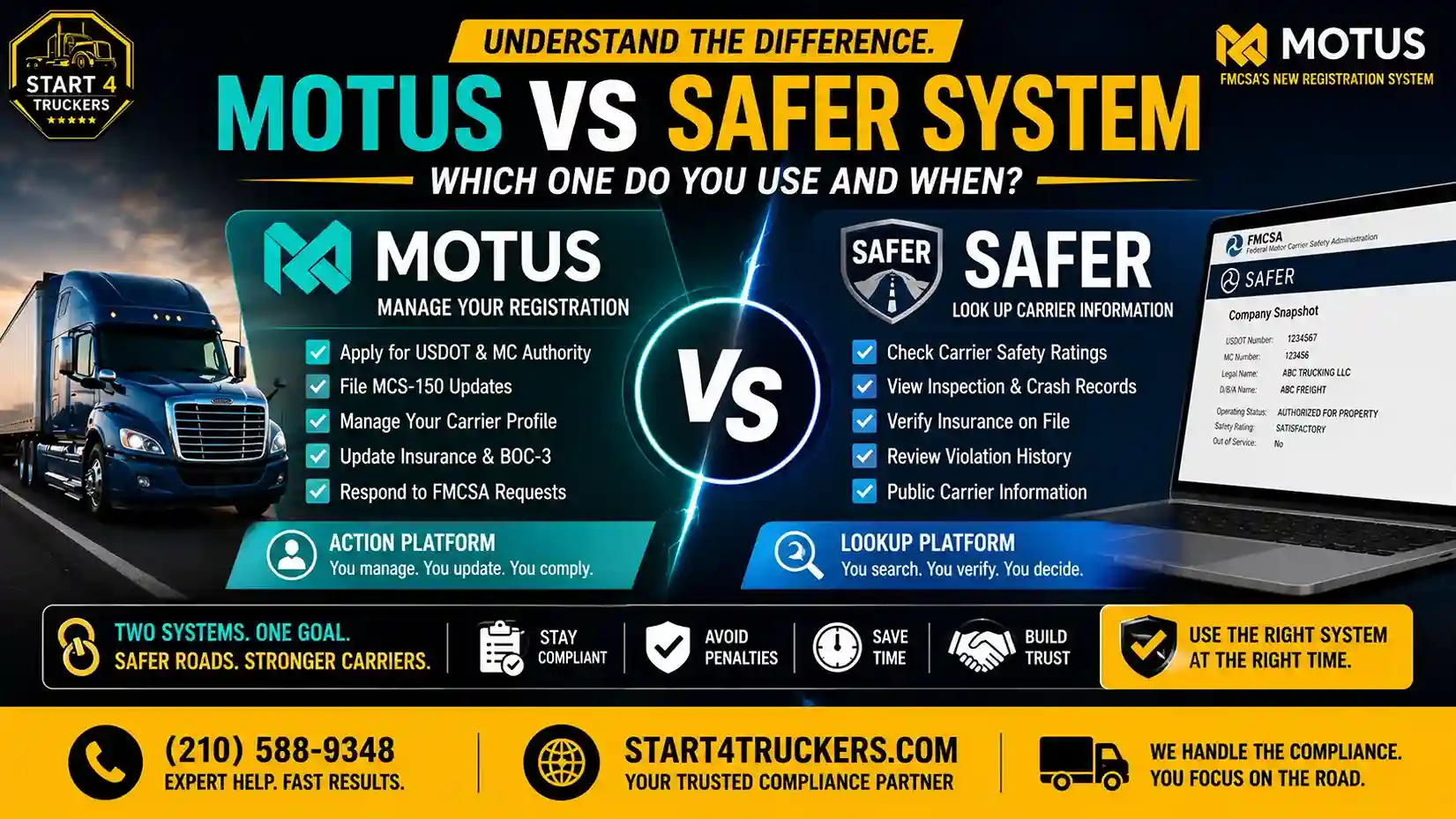
MOTUS is the FMCSA’s new carrier registration and compliance management platform. You use it to apply for USDOT numbers, manage MC authority, file MCS-150 updates, and handle all registration-related tasks. The SAFER system (Safety and Fitness Electronic Records) is a public database you use to look up carrier safety information, inspection records, and compliance history. MOTUS is where you manage your own registration. SAFER is where you and others can look up carrier records. They serve different purposes and are used at different times.
What Is MOTUS?
MOTUS is the Federal Motor Carrier Safety Administration’s new digital platform for carrier registration, authority management, and compliance tracking. It replaced the outdated Unified Registration System (URS) and became the primary portal for all carrier registration activity in 2026.
Every new USDOT number application, MC authority filing, MCS-150 biennial update, BOC-3 linking, and insurance filing management now flows through MOTUS.
Think of MOTUS as your personal carrier management dashboard. It is where you go to manage, update, and maintain your FMCSA registration.
For a complete breakdown of how MOTUS works and what it replaced, read our guide on the Motus FMCSA registration system.
What You Do in MOTUS
MOTUS is an action platform. You log in and do things:
- Apply for a new USDOT number
- Apply for MC authority
- File your MCS-150 biennial update
- Claim your existing USDOT number after migration
- Manage your carrier profile information
- Monitor your operating authority status
- View your insurance and BOC-3 filing status
- Respond to FMCSA notices and requests
Who Uses MOTUS
- Motor carriers registering or managing their USDOT number and MC authority
- Owner-operators applying for their own authority
- Freight brokers managing broker authority and surety bond filings
- Freight forwarders with FMCSA registration requirements
- Motus Company Officials: the designated owner or officer responsible for a company’s FMCSA account
How You Access MOTUS
MOTUS requires a verified Login.gov account for access. Every user must complete identity verification before they can register, claim records, or manage any FMCSA filings through the platform.
For a full walkthrough of the Login.gov and MOTUS setup process, read our guide on Login.gov and MOTUS: complete account setup guide for truckers.
What Is the SAFER System?
SAFER stands for Safety and Fitness Electronic Records. It is a publicly accessible database maintained by the FMCSA that allows anyone to look up carrier safety information, compliance history, and registration details.
Unlike MOTUS, SAFER is not a management platform. You cannot use it to register, update, or change anything. It is purely a lookup and research tool.
Think of SAFER as the public window into FMCSA carrier records. It shows you what is on file, but it does not let you change it.
What You Can Find in SAFER
SAFER contains a wide range of carrier information that is visible to the public:
- Carrier identification USDOT number, MC number, legal business name, DBA
- Operating authority status active, inactive, suspended, or revoked
- Safety rating: satisfactory, conditional, or unsatisfactory
- Insurance filing status whether required coverage is on file
- Inspection history roadside inspection records and results
- Crash data: reportable accidents on record
- Violation records out-of-service violations and safety violations
- Carrier contact information: phone number, address, email
- Cargo type: what type of freight the carrier is registered to haul
Who Uses SAFER
SAFER is used by a much broader audience than MOTUS:
- Shippers verifying a carrier’s authority and safety record before booking
- Freight brokers conducting carrier due diligence before tendering loads
- Insurance companies researching carrier safety history for underwriting
- Law enforcement checking carrier compliance at roadside inspections
- Carriers themselves checking their own public record for accuracy
- Industry researchers and compliance professionals tracking carrier data
- Enforcement agencies monitoring carrier safety performance
How You Access SAFER
SAFER is publicly accessible at safer.fmcsa.dot.gov. No login is required. No identity verification is needed. Anyone can search for any carrier by USDOT number, MC number, or company name.
MOTUS vs SAFER System: Side-by-Side Comparison
| Feature | MOTUS | SAFER System |
| Primary Purpose | Carrier registration and management | Carrier safety data lookup |
| Who Can Access | Verified carrier accounts only | Anyone public access |
| Login Required | Yes Login.gov verification | No public database |
| What You Can Do | Register, update, manage filings | Look up and view records only |
| USDOT Application | Yes | No |
| MC Authority Filing | Yes | |
| MCS-150 Filing | Yes | No |
| View Safety Rating | Limited | Yes full public record |
| View Inspection History | Limited | Yes full history |
| View Insurance Status | Yes your own filings | Yes public view |
| Real-Time Status Updates | Yes for your account | Yes public data |
| Carrier Lookup by Name | No | Yes |
| System Type | Private management platform | Public reference database |
| Replaced URS | Yes | No SAFER predates URS |
When to Use MOTUS
Use MOTUS whenever you need to take action on your FMCSA registration or compliance status. Here are the specific situations where MOTUS is the right system:
Applying for a New USDOT Number
If you are starting a trucking business, your first stop is MOTUS. All new USDOT number applications in 2026 go through the MOTUS portal after you complete Login.gov identity verification.
Our step-by-step guide on how to apply for a new USDOT number in MOTUS covers every step of this process.
Applying for MC Authority
After your USDOT number is issued, apply for your MC authority through MOTUS. This is required if you plan to haul regulated freight for hire in interstate commerce.
For the full MC authority application process, read our guide on how to apply for MC authority through MOTUS.
Filing Your MCS-150 Biennial Update
Your MCS-150 must be filed every two years through MOTUS to keep your USDOT number active. Filing late or missing it entirely leads to USDOT deactivation.
Learn everything about this filing in our guide on the MCS-150 biennial update in MOTUS.
Completing the URS to MOTUS Migration
If you are an existing carrier transitioning from the old URS system, you use MOTUS to claim your existing USDOT number and transfer your records to the new platform.
Read our complete FMCSA compliance transition from URS to MOTUS guide for the full migration walkthrough.
Managing Your Operating Authority Status
Use MOTUS to check and manage your authority status, respond to FMCSA notices, and confirm that your insurance and BOC-3 filings are correctly linked to your profile.
For a full explanation of what each status means, read our guide on operating authority status in MOTUS.
Updating Business Information
If your legal business name, address, phone number, or officer information changes, update it through MOTUS and file an updated MCS-150 to officially record the change.
Our guide on how to change your business name or address in MOTUS covers the full update process.
Renewing or Reinstating MC Authority
If your MC authority has lapsed or been suspended, use MOTUS to manage the reinstatement process and confirm all supporting filings are restored.
Read our guide on how to renew or reinstate MC authority in MOTUS for step-by-step instructions.
Need help managing your MOTUS registration or compliance filings? Call Start4Truckers LLC at (210) 588-9348. We handle your USDOT registration, MC authority filing, and MCS-150 updates so everything in MOTUS stays current and compliant.
When to Use the SAFER System
Use SAFER whenever you need to look up carrier information your own or someone else’s. Here are the specific situations where SAFER is the right tool:
Verifying Your Own Carrier Record
Before you start marketing your trucking business, check your own SAFER record. Confirm that your:
- USDOT number is correct
- Legal business name appears accurately
- Operating authority status shows as active
- Insurance filings are reflected
- Safety rating is listed correctly
If anything is wrong, the fix happens in MOTUS not in SAFER. SAFER just shows you what is on file.
Conducting Carrier Due Diligence as a Broker or Shipper
If you are a freight broker or shipper, SAFER is your primary tool for vetting carriers before you book loads with them. Check their authority status, safety rating, inspection history, and insurance filings before tendering any freight.
This is not optional due diligence it is a legal and ethical obligation. Using a carrier with suspended authority or a poor safety record creates liability for your brokerage.
For broker-specific FMCSA requirements, read our Motus for freight brokers guide.
Checking a Carrier’s Safety Rating
A carrier’s safety rating Satisfactory, Conditional, or Unsatisfactory is visible in SAFER. This rating reflects the FMCSA’s assessment of the carrier’s compliance with safety regulations based on inspections, audits, and violation history.
New carriers without a rating will show no rating until the FMCSA conducts a safety review during the New Entrant Safety Assurance Program.
Reviewing Inspection and Crash History
SAFER shows the full roadside inspection history for every carrier, including violations, out-of-service rates, and crash data. This information is publicly available and frequently reviewed by shippers, brokers, and insurers when making decisions about which carriers to work with.
A clean inspection history and low out-of-service rate make your SAFER record an asset for your business.
Looking Up a Competitor or Potential Partner
SAFER allows you to look up any carrier by USDOT number, MC number, or company name. This is useful for competitive research, verifying that a potential business partner is legitimately registered, or confirming that a carrier claiming authority actually has it.
How MOTUS and SAFER Work Together
MOTUS and SAFER are not competing systems. They are complementary parts of the FMCSA’s broader compliance infrastructure. Here is how they connect:
Data Flows From MOTUS Into SAFER
When you update your carrier profile in MOTUS, those changes eventually flow into the SAFER public database. This means:
- A name change filed in MOTUS will eventually update your SAFER record
- Insurance filings confirmed in MOTUS will appear in SAFER
- Authority status changes processed in MOTUS update your SAFER entry
- MCS-150 updates filed through MOTUS refresh your SAFER profile
There is typically a processing lag between when you update something in MOTUS and when it appears in SAFER. If you need to verify that a recent change has been processed, check SAFER a few business days after filing.
SAFER Reflects the Result of MOTUS Actions
Think of MOTUS as the source and SAFER as the output. Your MOTUS dashboard shows your account in real time. SAFER shows the public-facing version of your record as it was last updated.
If your SAFER record shows information that seems outdated, the fix is to update your records in MOTUS and wait for the change to propagate.
MCMIS: The Connecting Database
Both MOTUS and SAFER draw from and feed into the Motor Carrier Management Information System (MCMIS). MCMIS is the backend federal database that stores carrier registration records, safety data, inspection history, and enforcement records.
MOTUS is your interface for managing your MCMIS records. SAFER is the public interface for viewing those same records.
Common Mistakes Carriers Make With MOTUS and SAFER
Mistake 1: Trying to Update Records in SAFER
SAFER is read-only. You cannot update, correct, or change anything in SAFER directly. If your SAFER record is wrong, log in to MOTUS and correct it there. The update will flow through to SAFER after processing.
Mistake 2: Using SAFER to Manage Your Registration
Some carriers check SAFER to confirm their registration status and think they are done. SAFER only shows you what is on file. It does not replace the need to actively manage your registration through MOTUS.
Mistake 3: Assuming SAFER Is Always Current
SAFER reflects the most recently processed data from MCMIS. There is a lag between actions taken in MOTUS and updates appearing in SAFER. If you recently filed a change and it does not appear in SAFER yet, that does not mean the change was not processed it may just not have propagated yet.
Mistake 4: Not Checking Your Own SAFER Record
Many carriers have never looked up their own SAFER profile. Your record is what shippers, brokers, and enforcement personnel see when they check on your business. Know what it says. Confirm your safety rating, inspection history, and authority status are accurately reflected.
Mistake 5: Confusing the SAFER Lookup With FMCSA Licensing and Insurance Portal
The FMCSA also maintains a separate Licensing and Insurance (L&I) portal that shows more detailed insurance filing information than the basic SAFER record. If you need to check detailed insurance filing status, the L&I portal provides more granular information than SAFER alone.
Other FMCSA Systems You Should Know About
MOTUS and SAFER are the two most commonly confused systems, but they are not the only ones. Here is a brief overview of other FMCSA platforms and what they do:
| System | Purpose | Who Uses It |
| MOTUS | Carrier registration and management | Carriers, brokers, forwarders |
| SAFER | Public carrier safety data lookup | Anyone |
| MCMIS | Backend federal carrier database | FMCSA internal use |
| FMCSA L&I Portal | Insurance and authority filing details | Carriers, insurers, brokers |
| Drug and Alcohol Clearinghouse | CDL driver violation tracking | Carriers, employers, drivers |
| DataQs | Challenging incorrect inspection or crash data | Carriers |
| CSA (Compliance, Safety, Accountability) | Carrier safety measurement and monitoring | FMCSA, enforcement, industry |
Each system has a specific purpose. Using the right one for the right task saves significant time and prevents confusion.
How BOC-3 and Insurance Filings Connect to Both Systems
Your BOC-3 filing and commercial insurance certificate are managed through MOTUS but are visible in SAFER and the L&I portal.
Here is how the flow works:
- Your process agent files your BOC-3 through MOTUS
- Your insurer files your insurance certificate through MOTUS
- The FMCSA confirms both filings and links them to your carrier profile
- The filing status becomes visible in your MOTUS dashboard
- Updated insurance and BOC-3 status eventually appears in SAFER
If your BOC-3 or insurance does not appear correctly in SAFER, confirm the filing in MOTUS first. If it is confirmed there, wait for the SAFER update. If it is not confirmed in MOTUS, contact your process agent or insurer.
For full details on what a BOC-3 filing covers, read our complete BOC-3 filing guide. Use our BOC-3 filing service to get it submitted correctly.
How New Carriers Should Use Both Systems
If you are just starting a trucking company, here is a practical breakdown of how both systems fit into your journey:
Before You Register
Use SAFER to look up similar carriers in your area, understand what your future public record will look like, and verify that no one else has inadvertently registered under a business name similar to yours.
During Registration
Use MOTUS for everything. Apply for your USDOT number, apply for MC authority, set up your carrier profile, and link your insurance and BOC-3 filings.
For new carriers going through this process for the first time, our Motus for new carriers guide walks through every step in the correct order.
After Registration
Use SAFER to confirm your carrier record is publicly accurate. Check your authority status, insurance filing visibility, and basic carrier information. If anything is wrong, go back to MOTUS to correct it.
Use MOTUS on an ongoing basis to file your MCS-150 updates, monitor your authority status, and respond to FMCSA notices.
How Start4Truckers LLC Helps You Use Both Systems Correctly
Understanding which system to use and what to do in each is the first step. Getting your registrations, filings, and records correct across both platforms is the ongoing work.
Start4Truckers LLC helps motor carriers, owner-operators, and freight brokers across the United States manage their FMCSA registrations through MOTUS correctly and keep their SAFER records accurate.
Here is how we help:
- USDOT number registration filed through MOTUS via our USDOT registration service
- MC authority applications submitted through our MC number registration service
- MCS-150 filing handled through our MCS-150 filing service to keep your USDOT active and your SAFER record current
- BOC-3 filing submitted through our BOC-3 filing service so it appears correctly in both MOTUS and SAFER
- MOTUS account setup and migration complete guidance through Login.gov and carrier profile setup
- Ongoing compliance monitoring through our ongoing DOT compliance program so your records stay accurate in both systems
We serve carriers in Texas, Florida, California, Georgia, Ohio, Illinois, Pennsylvania, Tennessee, North Carolina, and every other state nationwide.
Check our plans and pricing or explore our full trucking compliance services to find the right support for your operation.
Want your MOTUS registrations filed correctly and your SAFER record accurate? Visit our USDOT Registration Services or call Start4Truckers LLC at (210) 588-9348. We handle the filings so your records are right in both systems.
Conclusion
MOTUS and the SAFER system serve completely different purposes, and knowing which one to use and when makes your FMCSA compliance management much simpler.
Use MOTUS to manage, register, update, and maintain your FMCSA carrier records. Use SAFER to look up and verify carrier information, your own and others’. They are not competitors. They are two parts of the same FMCSA compliance ecosystem, connected through the MCMIS backend database.
Start4Truckers LLC helps carriers across the United States keep their MOTUS registrations current, their filings accurate, and their SAFER records reflecting a clean, compliant carrier profile.
Want your FMCSA records right in MOTUS and accurate in SAFER? Contact Start4Truckers LLC today for expert help with USDOT registration, MC authority filing, MCS-150 updates, and full compliance management. Request your free consultation or call (210) 588-9348 now; let’s get your carrier records right across every FMCSA system.
Frequently Asked Questions
1. What is the difference between MOTUS and the SAFER system?
MOTUS is the FMCSA’s carrier registration and management platform where you apply for USDOT numbers, file MCS-150 updates, manage MC authority, and handle all compliance filings. The SAFER system is a publicly accessible database where anyone can look up carrier safety records, inspection history, and authority status. MOTUS is for managing your registration. SAFER is for viewing carrier records.
2. Does MOTUS replace the SAFER system?
No. MOTUS replaced the old Unified Registration System (URS) as the carrier registration platform. SAFER is a separate public lookup database that remains active and serves a completely different function. The two systems complement each other MOTUS manages carrier records, and SAFER makes those records publicly visible.
3. Can anyone access the SAFER system?
Yes. SAFER is a public database with no login requirement. Anyone shippers, brokers, law enforcement, researchers, or the general public can search for any carrier by USDOT number, MC number, or company name at safer.fmcsa.dot.gov.
4. How do I update my SAFER record?
You cannot update SAFER directly. SAFER is a read-only database. To update your carrier information, log into MOTUS and make the changes there. After the FMCSA processes the update, the corrected information will appear in SAFER within a few business days.
5. Why does my SAFER record look different from my MOTUS profile?
There is often a processing lag between updates made in MOTUS and when those changes appear in SAFER. If you recently filed a change in MOTUS, allow a few business days for the update to propagate into the SAFER public database. If the discrepancy persists beyond that, contact the FMCSA to investigate.
6. What is a safety rating in SAFER and how is it assigned?
A safety rating in SAFER reflects the FMCSA’s formal assessment of a carrier’s compliance with federal safety regulations. Ratings are Satisfactory, Conditional, or Unsatisfactory. They are assigned based on safety audits, inspection results, and violation history. New carriers typically show no rating until the FMCSA conducts a review during the New Entrant Safety Assurance Program.
7. Can shippers and brokers see my SAFER record?
Yes. Your SAFER record is fully public and is routinely checked by shippers, freight brokers, insurers, and load boards before they work with a carrier. Your authority status, safety rating, inspection history, and insurance filing status are all visible to anyone who looks up your USDOT number.
8. What is MCMIS and how does it relate to MOTUS and SAFER?
MCMIS (Motor Carrier Management Information System) is the FMCSA’s backend federal database that stores all carrier registration and safety data. MOTUS is the platform carriers use to manage their MCMIS records. SAFER is the public interface through which anyone can view those MCMIS records. Both MOTUS and SAFER connect to and draw from the same underlying MCMIS database.
9. How long does it take for MOTUS updates to appear in SAFER?
Most updates appear in SAFER within a few business days after being processed by the FMCSA. Complex updates or those requiring manual review may take longer. If a change is confirmed in your MOTUS profile but has not yet appeared in SAFER after 5 to 7 business days, contact the FMCSA for assistance.
10. Can I check my own carrier record on SAFER?
Yes. Search for your own USDOT number or company name at safer.fmcsa.dot.gov. Reviewing your own SAFER record periodically is good compliance practice; it shows you exactly what shippers, brokers, and enforcement personnel see when they check your business.
11. What does it mean if my authority shows as inactive on SAFER?
An inactive authority status in SAFER means your MC authority is not currently active. This could be because a required filing insurance, BOC-3, or MCS-150 has lapsed or because the FMCSA has taken an action against your authority. Log in to MOTUS to identify the specific cause and restore the missing filing.
12. Do I need to file anything in SAFER directly?
No. You never file anything directly in SAFER. All filings, MCS-150 updates, insurance certificates, BOC-3 designations, and authority applications are submitted through MOTUS. SAFER automatically reflects those filings once they are processed by the FMCSA.
13. How does the SAFER system help freight brokers?
Freight brokers use SAFER to verify carrier credentials before booking loads. They check authority status, safety rating, inspection history, and insurance filing visibility. This carrier vetting is a legal and ethical obligation for brokers. Using a carrier with suspended authority or a poor safety record creates liability for the brokerage.
14. Is SAFER part of the MOTUS platform?
No. SAFER and MOTUS are separate systems. SAFER predates MOTUS significantly and was in place long before MOTUS was built. They are both maintained by the FMCSA but serve entirely different purposes and operate independently.
15. How can Start4Truckers LLC help me manage my records across MOTUS and SAFER?
Start4Truckers LLC handles all your MOTUS filings, USDOT registration, MC authority applications, MCS-150 updates, and BOC-3 submissions so your carrier records are accurate in both MOTUS and SAFER. We also provide ongoing compliance monitoring to catch issues before they affect your public record or your authority status. Call (210) 588-9348 or request a free consultation to get started.