
FMCSA ELECTRONIC LOGGING DEVICES
FMCSA Compliant ELD Devices for Owner Operators
DOT Approved · Easy Installation · Hours-of-Service Tracking · Owner Operator Friendly
FMCSA Registered ELDs
30 Min Installation Time
5,000+ Trucks Equipped
24/7 HOS Tracking
1 Truck Minimum
What Are ELD Devices?
ELD devices for owner operators are FMCSA-mandated electronic logging devices that automatically record a driver’s hours of service (HOS), engine status, vehicle motion, and miles driven. Since the federal ELD mandate took effect in December 2019, almost every commercial vehicle with a USDOT number must use an ELD registered on the FMCSA approved devices list.
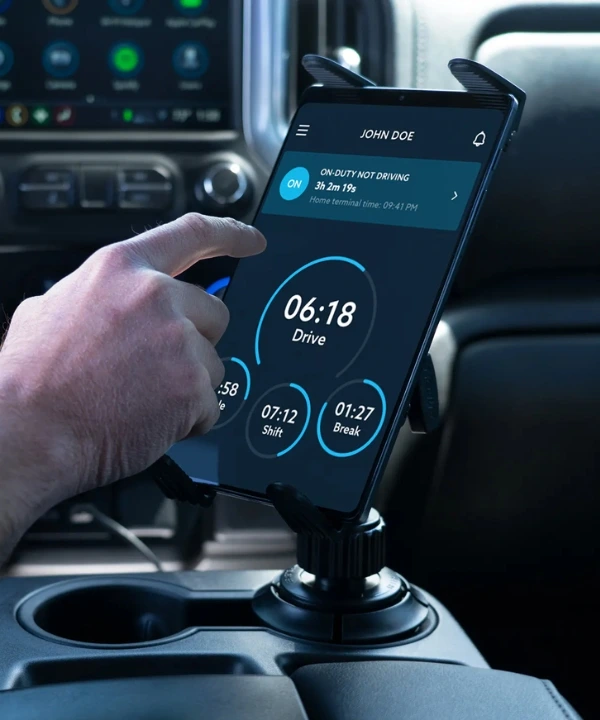
An ELD plugs into the truck’s diagnostic port, syncs with a driver-facing display (usually a tablet or smartphone app), and logs duty status changes automatically. The data feeds into the FMCSA system during roadside inspections through a standardized data transfer, replacing the paper logbooks that drivers maintained for decades.
Who Is Exempt From the ELD Mandate?
The ELD mandate covers most commercial drivers but not all. If you fall into one of these exemption categories, you are not required to use an ELD. Understanding whether you qualify for an exemption saves the cost of the device and the monthly service plan.
Short-Haul Drivers (150 Air-Mile Radius)
Drivers who operate within a 150 air-mile radius of their normal work reporting location and return to their start point within 14 consecutive hours are exempt from the ELD requirement. These drivers may use paper time records instead of electronic logging. The short-haul exemption has specific rules: the driver must operate within the 150-mile radius every day they use the exemption, they cannot use the exemption more than 8 days in any 30-day period, and the employer must maintain the paper time records for at least 6 months.
Vehicles Manufactured Before Model Year 2000
Any commercial motor vehicle with an engine model year of 1999 or older is exempt from the ELD mandate. These engines predate the on-board diagnostic port (OBD-II) standard that ELDs connect to. If you are running an older truck without a diagnostic port, you are not required to install an ELD and may use paper logs. The exemption is based on the engine model year, not the truck body year.
Drivers Not Required to Keep RODS
Drivers who are not required to maintain Records of Duty Status (RODS) for more than 8 days in any 30-day period do not need an ELD. RODS requirements apply to drivers of CMVs in interstate commerce or those hauling hazardous materials. Purely intrastate drivers in states that do not require RODS may also qualify for this exemption.
Drive-Away/Tow-Away Operations
Drivers engaged in drive-away or tow-away operations where the vehicle being driven is the commodity being delivered are exempt from the ELD mandate. This applies specifically to operations where the driver is delivering a vehicle not a driver moving equipment between job sites in their own truck.
Certain Agricultural Operations
Drivers hauling agricultural commodities have a 150 air-mile exemption during planting and harvesting seasons that mirrors the short-haul exemption. Additionally, drivers exempt under the agricultural 150-mile exemption may use paper logs during that period.
Important: If you are not sure whether your operation qualifies for an exemption, the safest answer is to use an ELD. Roadside inspectors do not give benefit of the doubt to drivers claiming exemptions without documentation. If you are claiming an exemption at a scale, you must be able to explain and document it on the spot.
What to Do When Your ELD Malfunctions
An ELD malfunction is not just an equipment inconvenience it is a compliance situation with specific required steps under federal rules. Handling a malfunction incorrectly can turn a technical problem into a violation.
Identify the Malfunction
ELDs are required to detect and display malfunctions automatically. If your ELD shows a malfunction indicator or fails to record engine data, you have a documented malfunction. Common malfunction causes include power disconnections, synchronization failures between the ELD and engine, data transfer failures, and positioning service failures.
Note the Malfunction
Write a note in your paper log recording the malfunction, the date and time it occurred, and the nature of the malfunction. You are required to reconstruct the HOS records for the current 24-hour period and the previous 7 days in paper log format during the malfunction period.
Switch to Paper Logs
Once a malfunction is identified, you must switch to paper logs immediately. You have 8 consecutive days to get the ELD repaired or replaced. During those 8 days, paper logs are your legal record of duty status. Carry blank paper log forms in your cab at all times for this reason.
Notify Your Motor Carrier
If you are an owner operator running your own authority, you are the motor carrier note the malfunction in your own records. If you are leased to a carrier, you must notify the carrier of the malfunction within 24 hours. The carrier is required to take action to repair or replace the device.
Show the Malfunction Note at Roadside Inspections
If a roadside inspector finds you on paper logs during the 8-day window, show them your written malfunction note. The inspector will verify the timeline. If you are within the 8-day window with proper documentation, you are in compliance with the malfunction procedure and should not receive a violation for being on paper logs.
Repair or Replace Within 8 Days
You must have the ELD repaired or replaced within 8 consecutive days of the malfunction. If you cannot get a replacement within that window, you must have documentation showing the effort to repair and may need to seek an extension. Operating beyond 8 days on paper logs without repair action is a violation.
ELD Device Options for Owner Operators and Fleets
The FMCSA maintains an official list of certified ELD devices at eld.fmcsa.dot.gov. Any device not on that list is non-compliant by default, regardless of what the manufacturer claims. When comparing ELD options, these are the categories that matter for trucking operations.
Feature | Why It Matters | What to Ask For |
FMCSA Registration | Non-registered devices are violations at every inspection | Verify on eld.fmcsa.dot.gov before buying |
Diagnostic Port Compatibility | Not all ELDs work with all truck makes/models | Confirm compatibility with your specific truck year and engine |
App Interface | You see this screen every day ease of use matters | iOS and Android both supported; offline mode available |
DVIR Integration | Daily Vehicle Inspection Reports in the same app saves time | Built-in DVIR with photo capability |
IFTA Mileage Tracking | Per-state mileage auto-tracked saves quarterly filing time | State-by-state mileage report exportable |
GPS Tracking | Fleet visibility and dispatch efficiency | Real-time GPS on the fleet dashboard |
Data Transfer Method | Required for roadside inspection must support both Bluetooth and WiFi transfer | Both Bluetooth and WiFi transfer modes certified |
Contract Terms | Some ELDs lock you into 24-36 month service contracts | Month-to-month service plan or short-term commitment |
We only recommend ELDs on the official FMCSA certified list. We also match your recommendation to your specific truck's diagnostic port type 9-pin for most older trucks, 6-pin for some configurations so you do not receive a device that does not connect to your specific engine.
Who Needs an ELD?
FMCSA rules cover most commercial drivers operating across state lines. Three groups should have an ELD active before their next haul.
Interstate Drivers
Any commercial driver required to keep records of duty status (RODS) for more than 8 days in a 30-day period needs a DOT approved ELD. That covers nearly all OTR and regional drivers operating across state lines.
New Owner Operators
First-time owner operators must have an ELD in place before the truck moves. Operating without one triggers immediate roadside violations and out-of-service holds. The ELD must be installed, activated, and fully functional before the first load under your authority.
Small Fleets
Fleets of any size with CMVs operating in interstate commerce need ELDs on every truck. Per-truck violations stack fast in roadside inspections. Each truck without a compliant ELD is a separate violation per inspection.
What Happens Without a Compliant ELD
Operating without an FMCSA-registered ELD is a direct federal violation. These are the specific consequences.
Immediate Out-of-Service Order
Roadside inspectors place the truck out of service for 10 hours when no compliant ELD is found. The load sits at the scale or on the roadside. The shipper or broker reroutes the freight. You lose the load revenue and the relationship.
Civil Penalties Starting at $1,000+
Per-violation fines for ELD non-compliance start around $1,000 and escalate with repeat findings. Multiple violations found in a single inspection stack individually. A carrier cited for three ELD-related violations in one inspection can face $3,000 or more in civil penalties from that single stop.
CSA Score Damage for 24 Months
ELD violations fall under the Hours-of-Service BASIC in the FMCSA's CSA scoring system. Every violation stays on your public safety record for 24 months and is visible to brokers, shippers, and insurers running carrier vetting checks. A pattern of HOS violations can result in enhanced inspections at every scale.
How Our ELD Setup Process Works
We help you choose the right FMCSA-registered ELD, ship it to you, and walk you through installation and account setup. Most owner operators are operational within an afternoon.
Choose Your ELD
We recommend FMCSA-registered ELDs based on your truck make, route type, and fleet size. We confirm compatibility with your specific diagnostic port before shipping.
Device Shipped Same Day
ELD device and installation cable ship the same business day. Most addresses receive it in 2 to 3 business days.
30-Minute Installation
Plug the device into the diagnostic port, pair with your phone or tablet, and verify signal. Installation takes about 30 minutes. We provide step-by-step phone support if you hit any issue.
Compliance Active
Your hours-of-service tracking, DVIR, IFTA mileage reporting, and roadside data transfer features all activate immediately. We verify that the device shows on the FMCSA certified list under your carrier record.
Hours of Service Rules — Quick Reference for Owner Operators
Your ELD enforces these rules automatically, but understanding them helps you plan routes and avoid violations before they happen.
HOS Rule | Limit | Reset |
11-Hour Driving Limit | Maximum 11 hours of driving after 10 consecutive off-duty hours | 10 consecutive hours off duty |
14-Hour Window | Cannot drive after 14 hours on duty, even if you have driving time remaining | 10 consecutive hours off duty |
30-Minute Rest Break | Must take a 30-minute break after 8 cumulative hours of driving | 30 minutes off duty or sleeper berth |
60/70-Hour Weekly Limit | Cannot drive after 60 hours on duty in 7 consecutive days OR 70 hours in 8 consecutive days | 34-hour restart (includes two 1am-5am periods) |
34-Hour Restart | Resets your weekly 60/70-hour clock must include two 1am-5am periods | After 34 consecutive hours off duty |
Sleeper Berth Provision | Split sleeper time (8+2 or 7+3) allows partial rest periods to extend the 14-hour window | Complex confirm with your ELD provider |
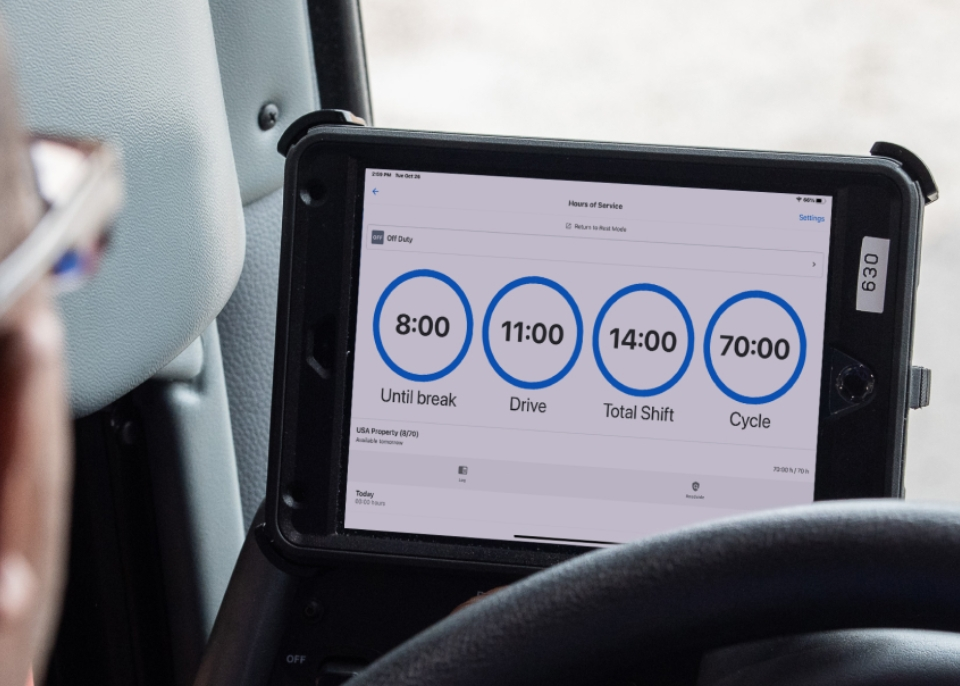
Your ELD tracks all of these limits automatically and warns you before you approach a violation. The display shows your remaining drive time, remaining on-duty time, and time until your 30-minute break is required. Drivers who understand the rules before installing the ELD use it more effectively and trigger fewer unnecessary violations.
Common ELD Mistakes That Cause Violations
Not Logging Personal Conveyance Correctly
Personal Conveyance (PC) is when you drive the truck for personal use going to a restaurant, getting fuel for yourself, driving to a rest stop. PC time does not count against your HOS. But using PC incorrectly claiming personal conveyance for driving between loads or moving freight is a violation that ELD data makes easy for inspectors to identify.
Not Switching Duty Status at the Correct Time
Your ELD starts recording drive time when the wheels move. If you forget to switch from Off Duty to On Duty before starting your day, your records show a gap. Gaps in duty status records are a common audit finding. Get in the habit of updating your duty status on the ELD before you start the engine.
Keeping the ELD in Driving Mode During On-Duty Not Driving
Loading, unloading, waiting at a dock, fueling, and doing pre-trip inspections are all On Duty Not Driving. Keeping the ELD in driving mode during these activities inflates your drive time and reduces the hours available for actual driving. Use the correct duty status for every activity.
Not Completing the Post-Trip DVIR
Federal rules require a Daily Vehicle Inspection Report at the end of every trip. Your ELD includes DVIR functionality. Skipping the post-trip DVIR is a separate citable violation from ELD HOS violations. Make the DVIR the last thing you do before going off duty each day.
ELD features compared
Not all ELDs offer the same features. Here is what matters when comparing the best ELD for trucking companies.
FMCSA Registered
ELD must appear on the official FMCSA approved devices list. Non-registered devices are non-compliant by default.
GPS Tracking
Real-time GPS for fleet visibility and route optimization. Not federally required but useful for dispatch.
DVIR Integration
Daily Vehicle Inspection Report features built into the same app. Reduces paperwork and audit risk.
IFTA Reporting
Per-state mileage automatically tracked for IFTA quarterly returns. Major time-saver.
Why choose Start 4 Truckers for ELD setup?
Choosing the wrong ELD locks you into a contract that does not fit your operation. We help you choose right the first time.
FMCSA-Registered Only
We only recommend ELDs on the official FMCSA approved devices list. No risk of buying a non-compliant unit.
Owner Operator Welcome
Single-truck operators get the same support as fleets. No volume minimums on hardware or service plans.
Easy Installation
Most ELD installs take 30 minutes. We provide step-by-step support if you hit any issue with the diagnostic port.
IFTA Integration
We activate IFTA reporting features on every install so per-state mileage flows automatically into your fuel tax records.
Same-Day Shipping
Devices ship same business day. Most owner operators receive their ELD within 2 to 3 business days.
Live Support
Real humans answer your calls at (210) 588-9348 for any installation or compliance question.
Frequently asked questions
ELD costs vary by manufacturer and features. Hardware typically runs $150 to $400 per unit. Monthly service plans range from $20 to $50 per truck depending on features. Some providers bundle hardware free with a 12 to 24-month service contract. Total first-year cost for owner operators usually falls in the $400 to $750 range.
Almost always, yes. Any owner operator required to maintain records of duty status (RODS) for more than 8 days in a 30-day period must use a DOT-approved ELD. The few exceptions are short-haul drivers operating within a 150 air-mile radius and drivers of vehicles older than model year 2000.
Physical installation usually takes 30 minutes. Plug the device into the truck’s diagnostic port, pair the device with your phone or tablet app, and verify the engine data flow. Account setup and driver onboarding typically takes another 30 minutes. Total time from box to compliance is usually under an hour.
The best ELD depends on fleet size, route type, and feature priorities. Owner operators often prioritize low monthly cost and simple interfaces. Larger fleets prioritize GPS tracking, DVIR integration, and reporting. We help match you to a registered ELD that fits your specific operation.
Most ELDs install on any truck with a 6 or 9-pin diagnostic port, which covers virtually all commercial trucks built after 2000. Older pre-2000 trucks may qualify for the engine-age exemption from the ELD mandate. We confirm compatibility before shipping.
Yes, but contract terms matter. Many ELD providers lock customers into 24 or 36-month service contracts with early termination fees. Start 4 Truckers prioritizes ELDs with flexible service agreements. Always review contract terms before committing to a provider.
Short-haul drivers operating within 150 air miles who return to their start location daily, drivers of vehicles with pre-2000 engine model years, drivers not required to keep RODS for more than 8 days in 30, drive-away/tow-away operators, and some agricultural drivers during planting and harvest seasons. If you are unsure, call us and we will confirm your situation before you order a device.
Switch to paper logs immediately, note the malfunction in writing with the date and time, notify your motor carrier (or document it yourself if you are your own authority), and have the device repaired or replaced within 8 consecutive days. Carry blank paper log forms in your cab at all times for this reason.
Most FMCSA-certified ELDs include per-state mileage tracking and data export for IFTA quarterly filing. We activate this feature on every device we set up. Your per-state mileage exports directly from the ELD into your IFTA quarterly return, eliminating the manual mileage sorting that causes most self-filer errors.
What our clients say
"Got my ELD shipped overnight and installed in twenty minutes. Drove the truck the same day, all hours-of-service tracking working perfectly. Easy."
— Cesar L., Owner Operator, Arizona
"We added eight trucks to our fleet last month and Start 4 Truckers got every ELD shipped, installed, and activated within a week. No downtime, no compliance gaps."
— Patricia W., Fleet Operations, Florida
Get your FMCSA compliant ELD today
Skip the research. We match you with the right ELD, ship it same day, and activate every feature for compliance and reporting.
FMCSA Registered · Same-Day Shipping · 30-Min Install · Owner Operator Friendly