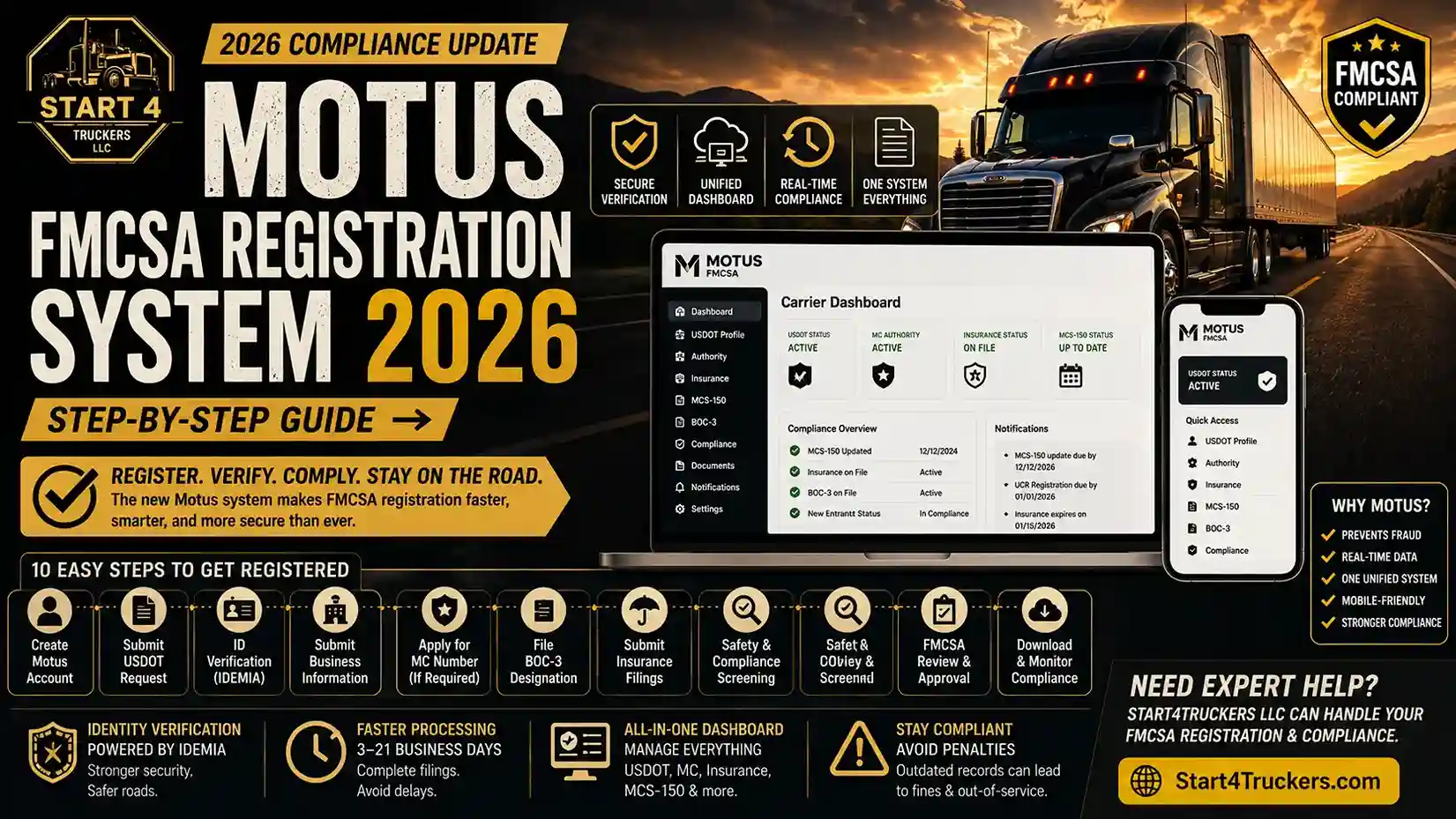
Your truck is loaded. Your driver is ready. Then, a roadside officer runs your carrier profile and finds a problem; your FMCSA registration is incomplete, outdated, or not migrated to the new system. Your vehicle gets placed out of service on the spot. This is not a hypothetical. It is exactly what happens when carriers ignore the Motus FMCSA Registration transition happening right now.
The Federal Motor Carrier Safety Administration (FMCSA) is modernizing its entire carrier registration infrastructure in 2026. The new system, known as Motus, replaces outdated legacy portals with a unified, digital compliance platform. Every trucking company, owner-operator, freight broker, and fleet manager needs to understand what this means for their operation.
This guide walks you through everything: what Motus is, how it works, how to register step by step, what it costs, and what happens if you ignore it.
What is the Motus FMCSA Registration System?
The Motus FMCSA Registration System is a modernized digital platform introduced by the Federal Motor Carrier Safety Administration to unify carrier registration, identity verification, and compliance management into a single centralized system. It replaces older, fragmented portals such as the Unified Registration System (URS) and the MCMIS database.
Motus is the new online home for everything related to your carrier identity with the FMCSA. Instead of logging into multiple systems for your USDOT number, MC authority, insurance filings, and MCS-150 updates, Motus brings it all under one roof.
Need help with FMCSA registration? Start4Truckers LLC handles USDOT registration and compliance filings so you can focus on the road.
Why FMCSA Introduced the Motus System
The old FMCSA registration infrastructure had serious problems. Multiple disconnected portals created data gaps. Fraudulent carriers could slip through identity checks. Double brokering scams exploited weak verification systems.
Motus was introduced to fix all of this by:
- Preventing fraud through advanced identity verification
- Modernizing the registration experience with a mobile-friendly digital platform
- Centralizing data so enforcement agencies have real-time, accurate carrier information
- Reducing compliance errors caused by outdated or duplicate carrier records
Key Systems Replaced or Unified by Motus
| Old System | What It Did | Status in 2026 |
| URS (Unified Registration System) | Carrier registration portal | Replaced by Motus |
| MCMIS Database | Motor carrier management records | Integrated into Motus |
| Legacy Licensing & Insurance System | Insurance and authority filings | Unified under Motus |
| Old FMCSA Login Portal | Individual system access | Replaced by a single Motus login |
How Motus FMCSA Registration System Works
Unified Registration Dashboard
The core feature of Motus is a single carrier dashboard where all your registration data lives. One login gives you access to your USDOT number, MC authority status, insurance filings, MCS-150 records, and compliance history.
No more jumping between systems. No more logging into separate portals for separate filings.
Identity Verification (IDEMIA Integration)
One of the biggest upgrades in Motus is identity proofing through IDEMIA, a government-grade identity verification provider. When you register or claim an existing USDOT number, Motus verifies:
- Your government-issued photo ID
- Your business identity and legal registration
- Your authorized representative details
This stops fraudulent carriers from registering under false identities, one of the biggest problems in the current system.
Digital Compliance Management Flow
The Motus workflow follows a clear path:
Registration → Identity Verification → Business Submission → Authority Application → Insurance Filing → FMCSA Review → Approval → Ongoing Monitoring
Each stage is tracked inside your Motus dashboard. You can see exactly where your application stands at any point during the process.
Step-by-Step Motus FMCSA Registration Process 2026
This is the most important section in this guide. Follow these steps in order.
Step 1: Create Your Motus Portal Account
Go to the official FMCSA website and access the Motus registration portal. Create a new account using your business email address. You will receive a verification email to confirm your account before proceeding.
Step 2: Submit Your USDOT Registration Request
Enter your business information including legal business name, physical address, mailing address, and business type. If you are registering a new carrier, this step creates your USDOT number application. If you already have a USDOT number, you will claim it in a later step.
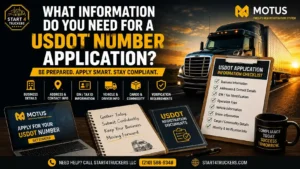
Need to understand your USDOT registration requirements before you begin? Review them first to avoid errors.
Step 3: Complete Identity Verification (ID Proofing)
This is the IDEMIA step. You will be prompted to verify your identity using a government-issued ID such as a passport or driver’s license. The system uses facial recognition and document scanning to confirm your identity. This step cannot be skipped.
Step 4: Submit Business Information
Enter full details about your trucking operation:
- Operating type (for-hire, private, both)
- Cargo type
- Vehicle count
- Interstate or intrastate operation
- Principal place of business
Accuracy here is critical. Incorrect information creates compliance issues and delays.
Step 5: Apply for MC Number (If Required)
If you operate as a for-hire interstate carrier, you must apply for an MC number (Motor Carrier authority) in addition to your USDOT number. Understand the difference between these two before applying. See our full guide on DOT number vs MC number.
Apply for your MC number directly through Start4Truckers LLC’s MC number registration service.
Step 6: File Your BOC-3 Designation
Before your MC authority can be activated, you must file a BOC-3 process agent designation. This assigns a legal representative in every state where you operate. Without a valid BOC-3 on file, your authority will not activate. Read our BOC-3 filing guide for a full explanation, or use our BOC-3 filing service to get it done fast.
Step 7: Submit Insurance Filings
Your insurance provider must file your liability insurance certificate (Form BMC-91 or BMC-91X) directly with FMCSA. Cargo insurance may also be required depending on your operation type. Your authority will not be granted until insurance filings are confirmed in the Motus system.
Step 8: Safety & Compliance Screening
FMCSA reviews your application against the MCMIS database and SAFER system to check for any existing violations, duplicate records, or safety concerns. New carriers are subject to the New Entrant Safety Assurance Program, which includes a mandatory safety audit within the first 12 months of operation.
Step 9: FMCSA Review and Approval
After all documents are submitted and verified, FMCSA reviews your application. Standard processing takes 3 to 21 business days depending on application volume and completeness. Incomplete applications significantly delay this timeline.
Step 10: Download Approval and Set Up Monitoring
Once approved, download your official USDOT registration and MC authority documents from your Motus dashboard. Set up compliance monitoring alerts inside the dashboard to receive notifications about renewal deadlines, insurance lapses, and MCS-150 update requirements.
Requirements for FMCSA Registration 2026
Business Requirements
- Legally registered business entity (LLC, corporation, or sole proprietor)
- Valid Employer Identification Number (Tax id) from the IRS
- Physical business address in the United States
- Designated authorized representative
Compliance Documents Required
- Completed USDOT application information
- BOC-3 process agent designation
- Liability insurance filing (filed by your insurance provider)
- MCS-150 Motor Carrier Identification Report file or update through Start4Truckers LLC’s MCS-150 filing service
Identity Verification Requirements
- Government-issued photo ID (passport, state ID, or driver’s license)
- Authorized representative must match business registration records
- IDEMIA verification must be completed before any authority is issued
Cost and Timeline of FMCSA Registration 2026
Estimated Cost Breakdown
| Registration Item | Estimated Cost |
| USDOT Number | Free |
| MC Authority (Operating Authority) | $300 (FMCSA filing fee) |
| BOC-3 Filing | $20–$50 (through a process agent) |
| Insurance Filing | Varies (based on carrier type and coverage) |
| MCS-150 Update | Free |
Processing Timeline
| Stage | Estimated Time |
| Account creation and ID verification | Same day |
| Application submission | 1–2 hours |
| FMCSA review period | 3–21 business days |
| MC authority activation (after BOC-3 + insurance) | 10 days post-approval |
| New entrant safety audit | Within first 12 months |
Common Motus FMCSA Registration Errors and How to Fix Them
Error 1: Identity Verification Failure
Cause: Blurry ID scan, mismatched name, or expired document.
Fix: Use a current, undamaged government ID in good lighting. The name on your ID must exactly match your business registration documents.
Error 2: Incorrect MCS-150 Data
Cause: Wrong vehicle count, incorrect operation type, or outdated address.
Fix: Review and update your MCS-150 before starting the Motus registration process. Discrepancies between MCS-150 data and your application trigger manual review delays.
Error 3: Insurance Filing Delays
Cause: Your insurance provider has not submitted the BMC-91 form to FMCSA.
Fix: Contact your insurance agent immediately and confirm the filing has been submitted directly to FMCSA through the Motus system. Do not wait this is the most common cause of authority activation delays.
Error 4: Duplicate Carrier Records
Cause: Multiple USDOT numbers under the same business, or a previously deactivated number that was not properly closed.
Fix: Contact FMCSA directly to resolve duplicate records before attempting new registration. Attempting to register over a duplicate will result in rejection.
Error 5: Portal Access Issues
Cause: Incorrect login credentials, unverified email, or browser compatibility problems.
Fix: Use Chrome or Firefox. Clear your browser cache. Confirm your email was verified during account setup. Reset your password if needed through the official portal.
Motus vs Old FMCSA Registration System
| Feature | Old System (URS / MCMIS) | Motus System (2026) |
| Registration portals | Multiple separate portals | Single unified dashboard |
| Identity verification | Minimal | Advanced (IDEMIA integration) |
| Fraud protection | Weak | Strong real-time verification |
| Mobile access | Limited / desktop only | Fully mobile-friendly |
| Insurance filing tracking | Manual, slow | Real-time tracking in dashboard |
| Compliance monitoring | Reactive | Proactive alerts and notifications |
| Data accuracy | Fragmented and outdated | Centralized and real-time |
| Application status | No visibility | Live status tracking |
The difference is significant. The old system required carriers to manage registrations across multiple disconnected portals, which created errors and compliance gaps. Motus eliminates that entirely.
What Happens If You Don’t Migrate to Motus System?
Ignoring the Motus transition is not a neutral choice. The consequences are real:
- Registration delays new applications submitted through old portals will be rejected or ignored
- Authority suspension risk carriers who do not update their records in Motus risk having their operating authority flagged as inactive
- Carrier inactivation: FMCSA can deactivate USDOT numbers that are not migrated or updated within required timeframes
- Compliance penalties operating with an inactive or non-compliant FMCSA registration can result in fines and out-of-service orders
- Loss of operating authority the most severe outcome for carriers who completely ignore the transition
If your authority gets suspended, you cannot haul freight legally until reinstatement is completed, a process that can take weeks.
How to Claim Your USDOT Number Using the Motus System
If you already have a USDOT number and need to link it to your new Motus account, follow this process:
- Log in to your Motus portal account
- Select “Claim Existing USDOT Number” from your dashboard
- Enter your existing USDOT number exactly as registered
- Complete IDEMIA identity verification to confirm you are the authorized account holder
- Review your MCS-150 data update any outdated information during this step
- Confirm your insurance filings are current and visible in the system
- Submit the claim for FMCSA review and approval
- Receive confirmation that your existing USDOT number is now linked to your Motus account
Important: If your MCS-150 has not been updated in the past 24 months, update it before claiming your USDOT number. Outdated records will slow down your claim approval.
Need help claiming your USDOT in the Motus system without delays or errors? Contact Start4Truckers LLC today to complete your registration and stay FMCSA compliant the right way.
FMCSA Compliance Requirements After Motus Registration
Ongoing Compliance Duties
Once registered, your compliance obligations do not stop. You must:
- Update MCS-150 every 24 months, or within 30 days of any operational change
- Maintain active insurance filings; any lapse can trigger authority suspension
- Pass the New Entrant Safety Audit within 12 months of receiving authority
- Complete UCR registration annually see our UCR Registration 2027 guide for full details
- Renew MC authority if it lapses learn how to renew your MC authority before it expires
Federal Safety Standards
All registered carriers must comply with:
- Hours-of-Service (HOS) rules under 49 CFR Part 395
- ELD (Electronic Logging Device) requirements for applicable carriers
- Drug and Alcohol Clearinghouse registration and reporting
- Vehicle inspection and maintenance standards under FMCSA regulations
For state-specific compliance, check our Florida trucking regulations 2026 guide if you operate in or through Florida.
Who Needs Motus FMCSA Registration?
| Carrier Type | Needs Motus Registration? |
| Interstate for-hire trucking companies | Yes |
| Owner-operators (crossing state lines) | Yes |
| Private carriers (interstate) | Yes |
| Freight brokers | Yes |
| Freight forwarders | Yes |
| Leasing companies | Yes |
| Intrastate-only carriers | Varies by state |
| New carriers starting in 2026 | Yes, must start with Motus |
Understanding whether you need interstate vs intrastate authority before registering is essential. Read our interstate vs intrastate trucking authority guide to determine which applies to your operation.
Documents Required for FMCSA Registration 2026
Have these ready before you start the Motus registration process:
- Government-issued photo ID (passport or state ID)
- Business Tax id (Employer Identification Number)
- Business registration documents (LLC or corporation paperwork)
- Physical and mailing business address
- Vehicle count and type information
- Cargo type details
- Insurance provider contact information
- BOC-3 process agent designation (or service provider details)
- Completed or updated MCS-150 information
Motus FMCSA Rollout Timeline (2025–2026)
| Phase | Timeline | What Happens |
| Phase 1: Pilot Launch | Late 2025 | BOC-3 filers and insurers migrated to Motus |
| Phase 2: Carrier Onboarding | Early 2026 | New carrier registrations go through Motus only |
| Phase 3: Full Integration | Mid 2026 | All existing carriers must migrate USDOT to Motus |
| Phase 4: Full Enforcement | Late 2026 | Non-migrated records flagged for review or deactivation |
Carriers who migrate early avoid the rush and reduce the risk of processing delays during peak onboarding periods.
How Motus FMCSA Affects Trucking Companies and Compliance Providers
For trucking companies, the Motus transition means more documentation, stricter identity requirements, and tighter deadlines. Carriers who have been operating with outdated FMCSA records for years will need to clean up their profiles before migration.
For fleet managers, Motus introduces real-time compliance monitoring that makes it harder to let renewals and updates slip through the cracks. This is a positive change but only if you are on top of it.
For compliance service providers, Motus increases the value of professional help. The identity verification requirements, multi-step filing process, and strict document requirements make DIY registration more complicated for carriers without compliance experience.
Start4Truckers LLC helps carriers navigate FMCSA registration, Motus migration, MCS-150 updates, BOC-3 filings, and ongoing compliance management. Their trucking compliance support service is designed specifically for carriers who want expert guidance without the guesswork.
Also, if you are starting a new trucking business alongside your registration, review our guide on how to get trucking authority and make sure your IFTA account and Form 2290 filings are also in order from day one.
Is Motus FMCSA Registration Mandatory?
For new carriers registering in 2026, Motus is the only available registration path. The legacy portals are being phased out and new applications are routed through Motus exclusively.
For existing carriers with active USDOT numbers, migration to Motus is expected to become mandatory as Phase 3 and Phase 4 rollout progresses through 2026. FMCSA has indicated that carriers who do not migrate risk having their records flagged as inactive.
The short answer: yes, treat it as mandatory. Waiting to see what happens is not a compliance strategy.
Motus FMCSA Registration Preparation Checklist
High Priority (Do These First)
- Update your FMCSA login credentials and create a Motus account
- Verify your business identity documents are current
- Update your MCS-150 if it has been more than 24 months
- Confirm your insurance filings are active and on file with FMCSA
Medium Priority (Do These Next)
- Review your MCS-150 vehicle count and operation type for accuracy
- Prepare your BOC-3 designation paperwork
- Verify your Tax id matches your business registration documents
- Contact your insurance provider to confirm they can file through Motus
Low Priority (Ongoing)
- Set up compliance monitoring alerts inside your Motus dashboard
- Schedule your MCS-150 biennial update reminder
- Train internal staff or designate a compliance contact for the account
Final Thoughts: Prepare for FMCSA’s Digital Transformation Now
The Motus FMCSA Registration system is not a future concern it is a 2026 reality. Carriers who migrate early will experience smooth transitions and uninterrupted authority. Carriers who wait will face delays, errors, and the very real risk of authority suspension at the worst possible time.
Here is your action plan:
- Create your Motus portal account now
- Gather all required documents before you start
- Update your MCS-150 if it is overdue
- File your BOC-3 and confirm insurance is active
- Complete identity verification and submit your application
- Monitor your dashboard for approval and compliance alerts
If you want expert help managing your FMCSA registration, Motus migration, and ongoing compliance, Start4Truckers LLC is ready to assist. From USDOT registration to MCS-150 updates to full trucking compliance support, their team handles it all so you stay legal and keep moving.
Get started with Start4Truckers LLC today. Do not let a registration error take your truck off the road.
Frequently Asked Questions
1. What is the Motus FMCSA Registration System?
Motus is the new digital registration platform introduced by the Federal Motor Carrier Safety Administration in 2026. It consolidates all carrier registration, identity verification, insurance filings, and compliance management into one unified dashboard, replacing older fragmented systems like URS and MCMIS.
2. How do I register with FMCSA in 2026?
Create an account on the Motus portal through the official FMCSA website. Complete identity verification, submit your business information, apply for USDOT and MC authority if needed, file your BOC-3, and confirm insurance filings. The full process is outlined step by step in this guide above.
3. Is FMCSA registration mandatory for trucking companies?
Yes. Any commercial carrier operating in interstate commerce must register with FMCSA and obtain a valid USDOT number. For-hire carriers crossing state lines also require an MC number. Operating without registration is a federal violation.
4. How long does FMCSA registration take in 2026?
Standard processing takes 3 to 21 business days after a complete application is submitted. Incomplete applications, insurance delays, or identity verification issues can extend this significantly. MC authority activation takes an additional 10 days after approval.
5. What documents are required for FMCSA registration?
You need a government-issued photo ID, business Tax id, legal business registration documents, vehicle and cargo information, insurance provider details, and a BOC-3 process agent designation. Full document checklist is included in this guide.
6. Do I need both a DOT number and an MC number?
It depends on your operation. A USDOT number is required for most commercial carriers. An MC number is required for for-hire interstate carriers hauling regulated freight. Private carriers may only need a USDOT number. See our DOT number vs MC number guide for a full breakdown.
7. What happens if I don’t complete FMCSA Motus registration?
Your carrier profile may be flagged as inactive, your operating authority may be suspended, and you risk out-of-service orders at roadside inspections. New carriers who bypass Motus entirely will be unable to obtain USDOT numbers or MC authority through any other channel.
8. How do trucking companies get operating authority?
Apply for an MC number through the Motus portal, file your BOC-3 designation, submit insurance filings, and wait for FMCSA approval. The full process is detailed above. Start4Truckers LLC’s MC number registration service can handle this for you.
9. Can I register my trucking company online through Motus?
Yes. The entire Motus registration process is completed online through the FMCSA portal. Identity verification is done digitally through IDEMIA. No in-person visit is required.
10. What is the difference between DOT and FMCSA registration?
Your DOT number (USDOT) is your carrier identification number issued through FMCSA. FMCSA registration is the broader process of establishing your legal operating authority, which includes your DOT number, MC number, insurance filings, BOC-3, and compliance records. They are related but not the same thing.
11. Who needs FMCSA registration in the USA?
Interstate motor carriers, for-hire trucking companies, owner-operators crossing state lines, freight brokers, freight forwarders, and leasing companies all require FMCSA registration. Intrastate-only carriers may be subject to state-level requirements instead.
12. How do I avoid FMCSA compliance violations?
Keep your MCS-150 updated, maintain active insurance filings, complete UCR registration annually, pass your New Entrant Safety Audit, use a registered ELD if required, and monitor your Motus dashboard for compliance alerts. Consistent recordkeeping is the most effective violation prevention strategy.
13. What is the Motus system used for in trucking compliance?
Motus serves as the central hub for all FMCSA-related carrier compliance. It manages USDOT registration, MC authority applications, insurance filing verification, identity proofing, MCS-150 data, and ongoing compliance monitoring for all registered carriers.
14. Is FMCSA registration required for intrastate trucking?
Federal FMCSA registration is generally required for interstate commerce only. However, intrastate carriers operating vehicles over 10,001 lbs GVWR may still need a USDOT number depending on their state’s rules. Check your state’s commercial vehicle regulations to confirm your specific requirements.
15. How do I check my FMCSA registration status?
Log in to your Motus dashboard and view your carrier profile status. You can also check your status through the FMCSA SAFER system at safer.fmcsa.dot.gov. Status updates typically appear within 24–48 hours of submission or changes