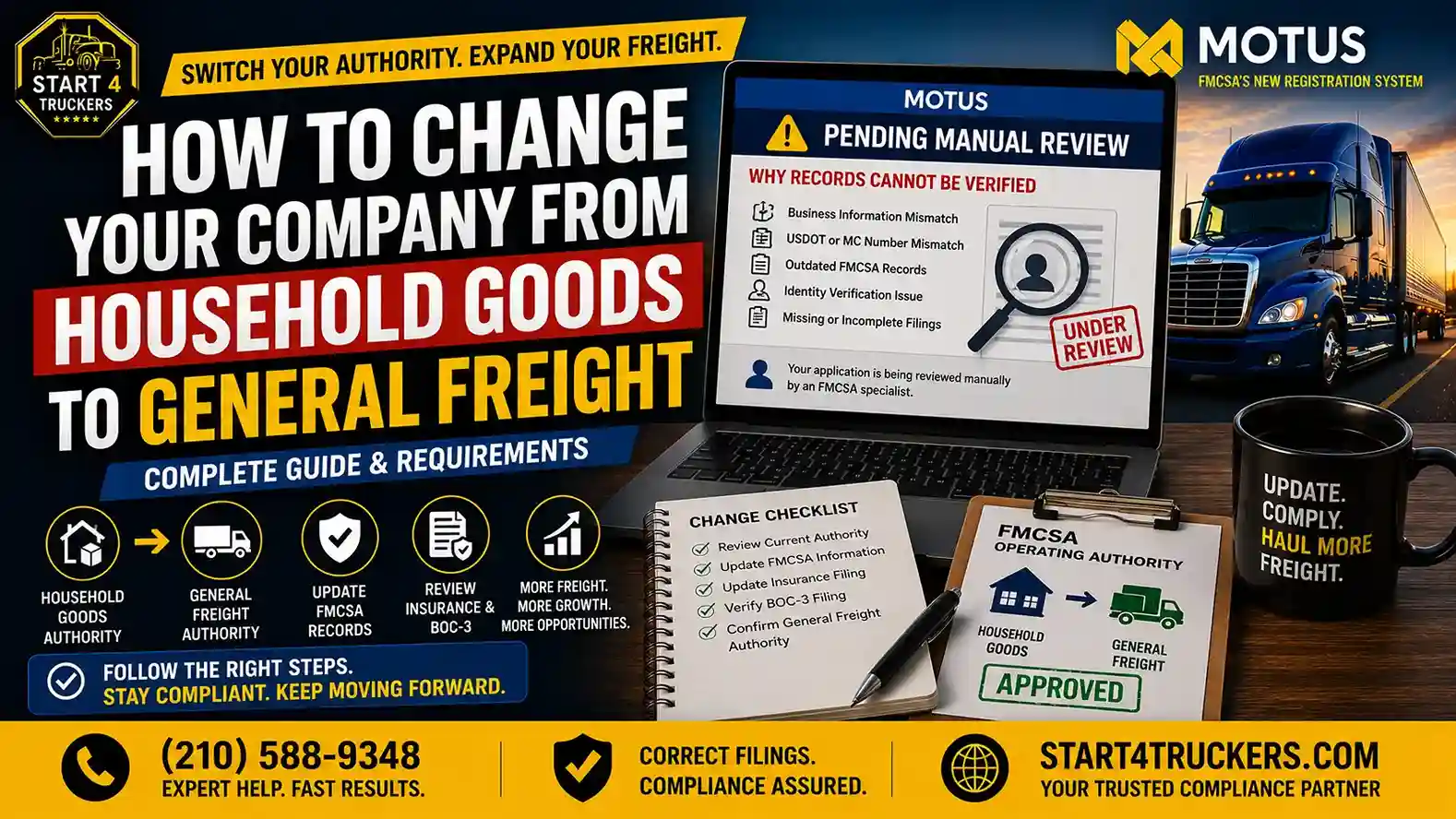
If you logged into your FMCSA account and saw “MOTUS Pending Manual Review,” you’re probably wondering what went wrong and whether your trucking business is now stuck in limbo. Take a breath. This status is common during the MOTUS transition, and in most cases it simply means the system found something it couldn’t confirm on its own.
MOTUS is FMCSA’s newer registration and identity verification system, and it checks your submitted information against existing FMCSA records before it approves anything automatically. When something doesn’t line up a business name, an address, a USDOT Number, or even your Login.gov identity MOTUS can’t move forward by itself. Instead, it flags your file for a human reviewer at FMCSA to look at manually.
This guide walks you through exactly what “pending manual review” means, why MOTUS says your records cannot be verified, how to fix the mismatch, and how to keep it from happening again.
What Does MOTUS Pending Manual Review Mean?
MOTUS Pending Manual Review means the system could not automatically confirm your submitted information against FMCSA’s records, so your application has been routed to an FMCSA staff member for manual verification. Common triggers include mismatched business details, outdated carrier records, identity verification problems, or missing registration data. It does not automatically mean your application was rejected.
What Is MOTUS Pending Manual Review?
MOTUS was built to replace parts of FMCSA’s older registration process (URS) with a system that verifies carrier identity and records more thoroughly before granting or updating operating authority. Most applications move through MOTUS automatically; the system checks your details, matches them to what’s already on file, and clears the application within minutes.
Manual review happens when that automatic match fails. Instead of denying the application outright, MOTUS hands it to an FMCSA reviewer who checks the discrepancy by hand. Think of it as a safety net: rather than rejecting a legitimate carrier over a typo or an old address, FMCSA has a person confirm the details before deciding.
Manual Review vs Automatic Verification in MOTUS
| Automatic Review | Manual Review |
| System verifies records instantly | An FMCSA staff member reviews the file |
| Faster processing | Requires additional checks and time |
| No mismatch detected | Information requires human verification |
| Approval usually same-day | Timeline varies based on workload |
Why Does MOTUS Say Your Records Cannot Be Verified?
When MOTUS displays the “records cannot be verified” message, it’s comparing several pieces of information at once: your carrier profile, business details, USDOT record, MC Number, operating authority status, and identity verification data from Login.gov. If even one of these doesn’t line up with what FMCSA already has on file, the system stops and escalates the file.
Business Name Does Not Match FMCSA Records
Small differences matter more than people expect. An LLC name that’s slightly different from your registered legal name, a DBA that wasn’t updated in FMCSA’s system, or even a spelling inconsistency can trigger a mismatch.
USDOT Number Information Does Not Match
If you entered your USDOT Number incorrectly, or if your carrier profile hasn’t been updated in a while, MOTUS may not be able to confirm that the number belongs to the business submitting the application.
MC Number or Operating Authority Verification Problems
Missing authority information, an authority status that’s inactive or revoked, or a mismatch between your MC Number and your USDOT record can all send an application to manual review. If your authority status looks off, our guide on operating authority status in MOTUS breaks down what each status actually means.
Login.gov Identity Verification Issues
MOTUS relies on Login.gov to confirm the identity of the person submitting the application. If your Login.gov identity doesn’t match the Company Official or authorized user on file, verification will fail. We cover this in detail in MOTUS identity verification failed.
Outdated FMCSA Registration Information
An old address, an outdated phone number, or contact information that hasn’t been refreshed in years is one of the most common and most avoidable causes of a manual review flag.
What Information Does MOTUS Verify During Manual Review?
Carrier Business Information
This includes your legal business name, physical and mailing address, and contact details on file with FMCSA.
USDOT Number and MC Number Records
MOTUS checks your carrier identification numbers, current authority status, and registration history for consistency.
Operating Authority Information
Reviewers confirm whether your authority is active, what type of authority you hold (property, household goods, or passenger), and whether your registration status supports the application you submitted.
Identity and Account Information
This covers your Login.gov credentials, your designated Company Official, and any authorized users tied to your account. For a refresher on this role, see what is a MOTUS Company Official.
Common Causes of MOTUS Manual Review Delays
Incorrect Information Submitted During Application
Simple entry errors a wrong company name, an incorrect address, or a mistyped Tax id are among the most frequent causes of a mismatch.
FMCSA Database Information Is Outdated
If your business moved, changed ownership, or updated its structure and FMCSA was never notified, the system will flag the discrepancy.
Missing or Incorrect Compliance Filings
An expired or missing MCS-150, an inactive BOC-3 filing, or a lapsed insurance filing can all stall your application. Learn more in what a BOC-3 filing and MCS-150 biennial update in MOTUS.
Duplicate Carrier Records
Multiple profiles tied to the same business, or leftover data from a previous application, can confuse the verification system.
Identity Verification Problems
Login.gov mismatches or incomplete user verification are a recurring source of manual review flags, especially for carriers who recently transitioned from the old FMCSA portal.
Should You Wait Before Using a Newly Issued Tax id in MOTUS?
If you’ve recently received a new Employer Identification Number (Tax id) from the IRS, it’s best not to use it in your MOTUS application immediately. Although your Tax id is issued right away, it can take 10 to 15 days for the information to be fully updated and recognized across the systems used during FMCSA verification.
Submitting a brand-new Tax id too soon may cause MOTUS to fail the verification process, which can result in your application being flagged for manual review or even rejected due to records that cannot yet be confirmed.
To avoid unnecessary delays, wait at least 10–15 days after your Tax id is issued before entering it into your MOTUS application. This gives the system enough time to recognize your Tax id, improving the chances of a successful verification and approval.
Pro Tip: If you’ve just obtained a new Tax id, be patient before submitting your MOTUS application. Waiting a couple of weeks can help prevent avoidable verification issues and save you time.
How to Fix MOTUS Pending Manual Review (Step-by-Step Guide)
Step 1: Review Your FMCSA Carrier Records
Start by pulling up your current carrier profile and comparing it against the SAFER System to see exactly what FMCSA has on file for your USDOT Number, MC Number, carrier profile, and operating authority.
Step 2: Compare MOTUS Information With FMCSA Records
Go line by line and verify:
- Company name
- Address
- Phone number
- USDOT Number
- MC Number
- Authority information
Even one mismatched field can be enough to trigger the review flag.
Step 3: Correct Any Incorrect Information
If you find a mismatch, correct it directly through your MOTUS account. This may involve updating your business details, registration information, or carrier profile. Our guide on how to change your business name or address in MOTUS walks through the process.
Step 4: Verify Required FMCSA Filings
Make sure the following are current:
- MCS-150 Update confirms your biennial update and registration accuracy are current
- BOC-3 Filing confirms you have an active process agent on file
- Insurance Filing confirms your liability insurance is active and correctly filed
Step 5: Complete Identity Verification Again
Re-confirm your Login.gov verification, and make sure your Company Official and any authorized users are properly linked to the account. See Login.gov and MOTUS: Complete Account Setup Guide for a full walkthrough.
Step 6: Wait for FMCSA Manual Review Completion
Once corrections are submitted, avoid the temptation to file a second application. Duplicate submissions often make the review process longer, not shorter. FMCSA may reach out for additional documentation; respond promptly if they do.
How Long Does MOTUS Manual Review Take?
There’s no single fixed timeline for MOTUS manual review. Processing time depends on the type of application, the severity of the record mismatch, whether information is missing, and FMCSA’s current workload. Some carriers see resolution within a few business days, while more complex mismatches can take longer. Rather than guessing, keep your MOTUS account updated and respond quickly to any FMCSA requests.
Does MOTUS Pending Manual Review Mean Your Application Is Rejected?
No. A pending manual review status simply means your application needs additional verification; it is not a rejection. In many cases, correcting the mismatched information resolves the issue and allows the application to move forward without further action needed on FMCSA’s part.
Can You Update Information While Your MOTUS Application Is Under Review?
In most cases, yes, you can correct inaccurate information while your application is pending. What you should avoid is submitting a brand-new application on top of the one already under review, since this can create duplicate carrier records and add more delay rather than less.
What Documents May Be Needed for MOTUS Verification?
- USDOT Registration Information confirms your carrier identification is accurate
- MC Authority Documents confirm your operating authority type and status
- Business Registration Documents confirm your legal business name and structure
- Insurance Documents confirm active liability coverage
- BOC-3 Filing Information confirms your process agent designation
- Identity Verification Documents confirm Login.gov and Company Official details
How to Prevent MOTUS Verification Problems in the Future
Keep FMCSA Records Updated
File your MCS-150 updates on time and keep your contact information current in FMCSA’s system.
Maintain Accurate Business Information
Make sure your LLC name, address, and ownership details match exactly across every FMCSA filing.
Keep Compliance Filings Active
Active insurance, a current BOC-3 filing, and an up-to-date authority status all reduce the chance of a future mismatch.
Common MOTUS Manual Review Mistakes Carriers Should Avoid
- Creating multiple applications instead of correcting the original one
- Entering different company information than what’s already on file with FMCSA
- Ignoring FMCSA record updates after a business name, address, or ownership change
- Using incorrect USDOT information when filling out the MOTUS application
- Not completing identity verification fully through Login.gov
How Start4Truckers LLC Can Help With MOTUS Manual Review Issues
Sorting out a MOTUS manual review flag on your own can eat up hours you’d rather spend running your business. Start4Truckers LLC helps carriers resolve MOTUS registration issues, correct FMCSA record mismatches, and complete compliance requirements without unnecessary delays. Our team handles:
- MOTUS account setup and troubleshooting
- FMCSA registration assistance
- Carrier profile corrections
- USDOT Number registration and lookups
- MC Authority support and renewals
- Login.gov assistance
- BOC-3 filing
- Ongoing DOT compliance support
If your application is stuck in manual review and you’re not sure why, call us at (210) 588-9348, and we’ll help you pinpoint the mismatch and get it corrected. You can also explore our trucking compliance support services or request a free consultation to get started.
Conclusion
Seeing “MOTUS Pending Manual Review” isn’t a dead end; it’s a checkpoint. It usually means MOTUS found a discrepancy between your submitted information and existing FMCSA records, whether that’s a business name mismatch, an outdated address, or an identity verification issue. By carefully reviewing your FMCSA records, correcting any errors, and confirming your required filings are current, most carriers can move their application past manual review without much additional wait.
Keeping your DOT compliance records accurate year-round is the best way to avoid this issue altogether. And if you’d rather have an expert handle it, Start4Truckers LLC is ready to help. Call (210) 588-9348 or contact us today.
Frequently Asked Questions
1. What does MOTUS Pending Manual Review mean?
It means MOTUS could not automatically verify your submitted information against FMCSA’s records, so your file was sent to an FMCSA reviewer to check by hand. It does not automatically mean denial.
2. Why can’t MOTUS verify my records?
Usually because something doesn’t match a business name, address, USDOT Number, MC Number, or identity verification detail differs from what FMCSA already has on file.
3. Why are my records not matching in MOTUS?
This is often caused by outdated FMCSA information, a typo during application, or a business change (name, address, ownership) that was never updated with FMCSA.
4. How long does MOTUS manual review take?
There’s no fixed timeline. It depends on the complexity of the mismatch, missing information, and FMCSA’s current workload. Keeping your account updated and responding quickly to requests can help move things along.
5. Does MOTUS manual review mean my application is rejected?
No. Manual review means additional verification is needed, not that your application has been denied. Many mismatches are resolved with a simple correction.
6. What information does MOTUS verify?
MOTUS checks your business information, USDOT Number and MC Number records, operating authority status, and identity verification details through Login.gov.
7. How do I fix MOTUS verification problems?
Compare your submitted information against your FMCSA records, correct any mismatches, confirm your MCS-150, BOC-3, and insurance filings are current, and re-verify your identity through Login.gov.
8. Why is my USDOT Number not matching in MOTUS?
This can happen if the number was entered incorrectly, your carrier profile is outdated, or there’s a registration mismatch tied to your USDOT record.
9. Why is my MC Number not verified in MOTUS?
Missing authority information, an inactive authority status, or a mismatch between your MC Number and USDOT record can all cause this issue.
10. Does Login.gov affect MOTUS approval?
Yes. MOTUS uses Login.gov to confirm your identity as the Company Official or authorized user. A mismatch here can trigger manual review on its own.
11. What documents are required for MOTUS manual review?
You may need USDOT registration information, MC authority documents, business registration records, insurance documents, BOC-3 filing information, and identity verification documents.
12. Can I update information during MOTUS review?
In most cases, yes. Correcting inaccurate details is generally allowed. Avoid filing a duplicate application, as that can complicate and extend the review process.
13. How do I check my MOTUS application status?
Log into your MOTUS account through the FMCSA portal to view your current application status and any messages from FMCSA regarding your review.
14. Can FMCSA manually approve my MOTUS application?
Yes. Once an FMCSA reviewer confirms your corrected information matches their records, they can manually approve the application.
15. Can Start4Truckers LLC help fix MOTUS verification issues?
Yes. Start4Truckers LLC helps carriers identify record mismatches, correct FMCSA filings, and resolve MOTUS manual review issues. Call (210) 588-9348 to get started.