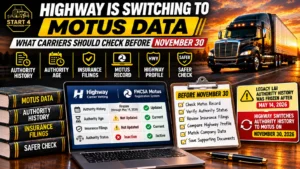

FMCSA began retiring legacy registration tools on May 14, 2026. After a short transition period, Motus: USDOT Registration System launched for all users on May 19, 2026. Motus is now the system for new USDOT number and operating authority applications.
If you already have a USDOT number, it did not change. What changed is how you sign in, update your record and file with FMCSA. This guide shows what moved, what you need to do and where carriers get stuck.
What Changed When Motus Launched
FMCSA published its Motus notice in the Federal Register on April 29, 2026. Supporting companies got access first. That group includes BOC-3 filers, insurance companies and filing services. The agency opened their accounts on December 8, 2025.
The main switch came in May. FMCSA’s own notice says Motus replaced the old registration tools after an IT transition that began May 14 at 8:00 PM ET. Registration functions in the old systems stayed offline through May 18. No one could file amendments, edits or new filings during that window.
Here is what moved:
| Task | Before | Now |
| New USDOT number and authority application | URS | Motus |
| BOC-3 and insurance filings | Licensing and Insurance (L&I) system | Motus |
| Registration updates | FMCSA Portal | Motus |
| Looking up a company | SAFER and L&I | SAFER still works. Motus has public search too |
Two details matter. L&I still lets you view historical records. The FMCSA Portal also stays open, but its registration options are gone.
Does This Apply to You?
Motus affects businesses and service providers that use FMCSA registration tools, but the steps depend on the type of registration and whether you are a new or existing registrant.
New carriers must apply in Motus. There is no other path. URS no longer exists.
Existing carriers should set up access and claim their company record in Motus before they need to complete an electronic registration action. The exact steps may depend on the filing and the company’s verification status.
Filing companies and agents (process agents, insurers, service providers) already had to create supporting-company accounts. Carriers who use one should confirm it still has the right access to their record.
What Stays the Same
Not everything changed, and that is good news.
- Your USDOT number stays the same.
- Existing MC and other docket numbers stay the same.
- You still need a BOC-3 (the form that names your process agents, the people who accept legal papers for you in each state) and active insurance on file.
- You still file the MCS-150 update every two years.
- You still renew UCR every year.
- SAFER still shows your public safety and registration data.
- Your drug and alcohol program, Clearinghouse account and inspection records are separate from Motus.
Motus changes where you go. It does not change what FMCSA expects.
What Is New Inside Motus
This is the part many carriers miss. Motus works differently from URS in a few ways that affect your daily paperwork.
Login.gov sign-in
Login.gov is a federal sign-in service. You create an account and prove who you are. Motus uses it instead of the old USDOT PIN style of access.
Company permissions
Motus is built around user roles on a company record. More than one verified person can have access. That helps when a dispatcher or office manager needs to file for you. It also means the person who always handled your updates may not have access until you add them.
Randomized numbers for new registrants
FMCSA now randomizes newly issued USDOT and docket numbers to help prevent fraud. Existing numbers do not change.
One docket number per new authority
If you apply for more than one authority at once, each new authority gets its own docket number and its own history. Authorities that already share a docket number stay as they are. The prefixes (MC, MX, FF) did not change.
USDOT suffix codes
New USDOT numbers for first-time registrants in Motus carry a letter suffix. It shows what kind of business you registered as. Existing numbers do not get one. It is not a marking you put on your truck. The codes are:
- B: Broker
- C: Property Carrier
- E: Enterprise
- F: Freight Forwarder
- H: Household Goods Carrier
- N: Non-North America Domiciled
- P: Passenger
- R: Intrastate Carrier
- V: Private Carrier
- X: MX Long-Haul
- Z: MX Commercial Zone
Codes combine. A suffix of (BCF) means property carrier, freight forwarder and broker. Cargo tank, intermodal equipment provider and hazardous material registrations have no suffix.
Clearer pending reasons. Status names did not change. But Motus now tells you why something is pending. You may see “Pending – FMCSA Review,” “Pending – Process Agent (Form BOC-3) Filings” or “Pending – Financial Responsibility Filings.” That tells you what to fix.
How to Transition: Existing Carriers
Do these steps in order. Most delays come from skipping the first one.
1. Check your record before you log in
Look up your company in Motus public search or SAFER. Compare your legal name, address, phone and email with your business records. Claiming a company matches what you enter against what FMCSA holds. A wrong or old detail can block the claim.
2. Pick one owner for the account
Choose someone permanent, such as the owner or a trusted office manager. Do not use a driver who may leave. Do not share one login among several people.
3. Create your Login.gov account
Go to login.gov and finish identity verification. This step can take longer than people expect, so do it before you need to file. Use an email address you control.
4. Create your Motus profile and claim your company
Sign in to Motus with your Login.gov account and follow the prompts to access or claim the company record associated with your registration. The available options may depend on your account and company type. You are not registering again. You are linking yourself to the record you already have.
5. Add other users
If someone else files for you, give them access in Motus. Give each person only the role they need.
6. Confirm your filings are showing
Check that your BOC-3 and insurance filings appear on your record. If you use a filing company, confirm it can still file on your behalf.
7. Check your due dates
Find your next MCS-150 update month and your UCR renewal. Do not wait for the last week. A rushed filing in a new system is how mistakes happen.
8. Keep a simple log
Write down when you created accounts, what you verified and what you filed. Save screenshots of errors. If a filing is questioned later, you have proof.
How to Apply: New Carriers
New carriers start in Motus. The USDOT number is free from FMCSA. The MC authority carries a government filing fee of $300 per authority type. Our service fees are separate from government fees.
In our registration experience, eligible applicants can often get USDOT and MC numbers in the same session. Sometimes it happens within minutes. But a number is not the same as active authority. The USDOT number can show Active while the MC authority still shows Not Authorized.
Authority becomes active only after these pieces are in place:
- Your BOC-3 is on file.
- Your insurance filing is on file.
- The protest period is over. This is a short window after FMCSA announces your application when others can object.
In routine cases, operating authority generally becomes active after the 10-business-day protest period has passed, provided the required BOC-3 and insurance or financial responsibility filings are on file and no other requirements remain outstanding. Cases that go to manual business or identity review can take about 2 to 4 weeks. FMCSA controls the timing, and no one can pay to speed it up.
If you want help with this part, we handle USDOT registration, MC authority and BOC-3 filing.
Common Problems and What to Do
Carriers have reported the same few problems since launch.
You cannot claim your company. This usually means your information does not match FMCSA’s record. Fix the mismatch first, then try again. Do not treat it as a system error until you have checked the legal name and address.
Identity verification stalls. Login.gov checks can fail or take time. Make sure the name matches your ID. If you are stuck, contact support instead of starting over with a new account.
You created a duplicate account. Do not create a second account to get around an error. Duplicates are harder to clean up than the original problem.
Insurance or authority filings are slow. Early on, some workflows ran slowly. Check the pending reason on your record. It tells you whether FMCSA, your process agent or your insurer needs to act.
You are not sure who to call. Use “Contact FMCSA” inside Motus for chat, email or phone help, available 8:00 AM to 8:00 PM Eastern. FMCSA also lists its Contact Center at 1-800-832-5660 for help with profile creation and identity verification.
When you contact support, send one request. Repeat tickets for the same issue can slow things down. Include screenshots, the time you tried and any confirmation numbers.
Mistakes That Cost Carriers Time
- Waiting until a filing is due to create a Motus account
- Letting one unverified Login.gov account block the whole company
- Claiming a company with an old address or a different legal name
- Assuming your old filer still has access
- Skipping the log of what you filed and when
- Confusing a new USDOT number with active authority
Do It Yourself or Get Help?
You can do all of this yourself. Motus is free to use, and FMCSA offers training materials on its resource hub. If you have one truck, a clean record and time, the steps above are enough.
Help makes sense when your records do not match, your authority is stuck in pending, you are applying for the first time or you just do not have the hours. We file in Motus every day, so we know which pending reasons need what.
FAQs
Is URS still available?
No. URS was permanently taken offline during the May 2026 transition. New USDOT number and operating authority applications now go through Motus.
Do I need a new USDOT number?
No. Your number stays the same. You claim your existing record in Motus instead of registering again.
Do I have to re-apply for my MC authority?
No. Existing authority and docket numbers stay as they are.
What is Login.gov, and why do I need it?
Login.gov is a federal sign-in service. Motus uses it to confirm who you are before it lets you file for a company.
Can more than one person use the same Motus company record?
Yes. Motus uses company permissions, so several verified users can have access. Each person signs in with their own account.
Why does my new USDOT number have a letter on the end?
It is a suffix that shows your registered business type, such as C for property carrier. Only new first-time registrants in Motus get one. It is not a truck marking.
My USDOT number is active, but my MC shows “Not Authorized.” Why?
They are separate statuses. MC authority needs your BOC-3, insurance filing and the end of the protest period before it becomes active.
How long does it take to get authority in Motus?
In routine cases, operating authority generally becomes active after the 10-business-day protest period, once required filings are recorded and no other requirements remain outstanding. Cases requiring manual review can take longer. Cases under manual review can take about 2 to 4 weeks. FMCSA sets the timing.
Where can I see my record after the switch?
Use Motus public search or SAFER. As a good practice, check your Motus and SAFER records periodically, especially after a filing or company change, to confirm the information is displaying correctly.